


Cleanfox: Spam & Email Cleaner
4.78.37K Reviews
App Specs
- Version
- 3.30.31-1196
- Updated On
- License
- Free
- Downloads
- 10,000,000+
- Developer
- NielsenIQ
- Categories
- Productivity
- Platform
- Android, iOS
Screenshots
 Analysis by AppCompare
When I review an inbox-cleaning app, I start with the mess most people actually have: a pile of newsletters, store updates, and old mailing lists mixed in with messages I still need. Cleanfox is designed for that particular chore. It gives you a way to sort through recurring email and act on it in batches, rather than searching for each sender and dealing with one message at a time.
That makes it most useful when your inbox is noisy but still contains important conversations. I wouldn’t treat it as a replacement for a full email app or as a magic filter for every kind of spam. I see it as a focused cleanup tool: useful when I want to make deliberate decisions about subscriptions and reduce the steady stream of mail that keeps returning.
Starting with the inbox you already have
The first decision is whether you’re comfortable connecting an email account to a separate service. That step matters because an inbox can include receipts, account notices, and personal correspondence alongside promotional mail. I’d choose an account I can review carefully, then take time to understand what Cleanfox is showing before making changes. If you’re especially cautious about granting an app access to email, a manual cleanup in your regular mail app may suit you better.
Cleanfox is a free productivity app from Foxyteam, with an Everyone age rating. It has a 4.7 average from around 316,000 ratings and more than 10 million installs. Those figures suggest it’s a familiar option for people looking to tackle subscription clutter, but popularity doesn’t remove the need to review each action. The current version is 3.30.29-1193, and the app first appeared on January 4, 2017.
The Magic of Inbox Decluttering
When I first heard about Cleanfox, I was skeptical. An app that cleans up my emails? Sounded like something out of a tech fairy tale. But, curiosity got the better of me, and I decided to give it a whirl. The setup was surprisingly straightforward. You link your email account, and voilà, Cleanfox goes to work.
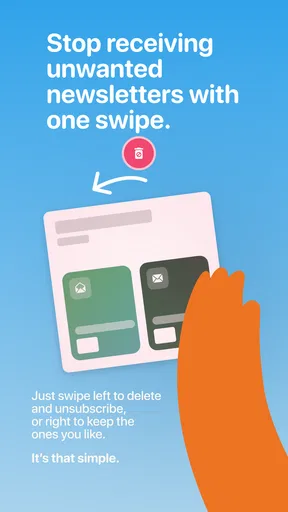
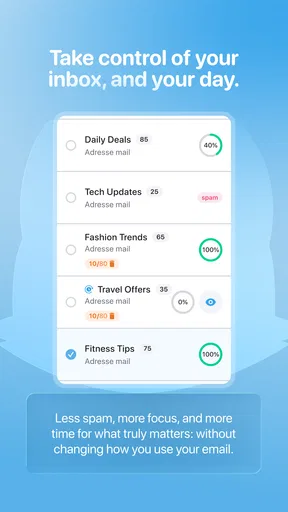
The app scans your inbox and identifies newsletters and spam. It’s like having a personal assistant who knows exactly what you never want to see again. You’re presented with a list of emails, and you can swipe left to delete, right to keep, or hit the unsubscribe button. It's a simple, swipe-based interface that feels oddly satisfying. Say goodbye to that newsletter you accidentally signed up for three years ago!
Performance and Features
One of the standout features of Cleanfox is its ability to manage multiple accounts. Got a Gmail, Yahoo, and maybe a sneaky Hotmail from back in the day? Cleanfox has you covered. It’s like having a universal remote for your emails. Plus, the app gives you a neat little summary of how much carbon footprint you’ve saved by cleaning up your inbox. Who knew decluttering could also give you eco-friendly bragging rights?
Worth Reading Before You Choose

EA SPORTS FC Mobile 26 Is a Bigger Football Game, but It Takes Time

Flipboard Shows What News Apps Must Do Beyond the Feed

Switching to Android Auto Means Rethinking Your Driving Routine

Google Calendar Makes a Crowded Week Easier to Manage

Ludo King Makes the Most of the Minutes Between Plans

Baby Panda World Brings Quick Play to Modern Phones, but Its Game Library Feels Busy
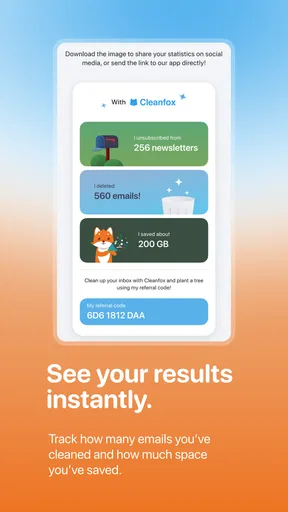
Another thing I loved is how Cleanfox keeps track of your progress. It tells you how many emails you've deleted and how many subscriptions you've unsubscribed from. It's a bit like gamifying the whole decluttering process, making it less of a chore and more of a game you actually want to play.
Making the cleanup deliberate
The swipe controls are quick, but I’d avoid treating the list like a stack of cards to clear as fast as possible. A sender name can be familiar while the reason you receive those messages has changed. For a practical first pass, I’d keep anything tied to orders, appointments, bills, or account security, and focus on obvious promotional senders. That small pause is worthwhile: an unsubscribe action affects future mail, while deleting a message only removes what is already there.
A useful workflow is to start with the subscriptions you recognize and no longer read, then leave uncertain senders for a second look. This is especially helpful if an account has years of accumulated newsletters. I’d also do the first session when I have a few calm minutes rather than while rushing between tasks; the app makes decisions easy to execute, but only you know which messages are still useful.
Where it fits beside your email app
Cleanfox works best as a companion to the inbox you already use. Your normal email app remains the place to read replies, find receipts, and handle conversations. Cleanfox is the more targeted option when the problem is recurring mailing-list clutter and you want a visual way to sort it. If you only receive a few unwanted messages, the unsubscribe and block controls already built into many email apps may be simpler and avoid adding another service to your routine.
There’s also a difference between unwanted newsletters and malicious spam. A recognizable shop or publication that sends too often is a reasonable candidate for unsubscribing. A suspicious message from an unknown sender is different: I wouldn’t interact with its links or assume that a cleanup tool replaces the spam-reporting and safety features in my main email provider. Keeping that distinction in mind helps prevent a tidy inbox from becoming the only measure of email security.
Performance and Features
One of the standout features of Cleanfox is its ability to manage multiple accounts. Got a Gmail, Yahoo, and maybe a sneaky Hotmail from back in the day? Cleanfox has you covered. It’s like having a universal remote for your emails. Plus, the app gives you a neat little summary of how much carbon footprint you’ve saved by cleaning up your inbox. Who knew decluttering could also give you eco-friendly bragging rights?
Another thing I loved is how Cleanfox keeps track of your progress. It tells you how many emails you've deleted and how many subscriptions you've unsubscribed from. It's a bit like gamifying the whole decluttering process, making it less of a chore and more of a game you actually want to play.
Using more than one account without mixing things up
Having multiple accounts available is handy if newsletters land in an old personal address as well as a current one. I’d still work through them one at a time in my head: decide what belongs in the account used for shopping, what belongs in the address used for family or work, and what can go. That mental separation reduces the chance of removing a mailing list from an account where it still serves a purpose.
A low-effort maintenance habit is to revisit the tool when a familiar sender starts crowding the inbox again, rather than waiting until every account feels unmanageable. The point isn’t to keep chasing a perfectly empty inbox. It’s to remove recurring noise while leaving useful records and updates accessible in the place you expect to find them.
Security and Privacy
I know what you're thinking—"But what about my privacy?" Rest easy. Cleanfox takes security seriously. They don't keep or sell your data, which is a breath of fresh air in today’s data-driven world. They only use your data to clean your inbox and then it's peace out.
It's also worth mentioning that Cleanfox doesn’t just delete your emails. It actually helps you unsubscribe from them, which is a more permanent solution than just deleting them. This way, you’re not just cleaning up today's mess, but preventing tomorrow's.
What changes after a cleanup
Imagine checking your personal inbox after a busy week and seeing new receipts, a delivery update, and a handful of promotional emails from shops you once browsed. In Cleanfox, I’d identify the recurring senders I genuinely no longer want, unsubscribe from those, and delete only the existing messages I’m confident I don’t need. Then I’d return to my usual mail app for the delivery update and any conversation that needs a reply. That handoff is important: the cleaner handles the repetitive sorting, while the email app remains the everyday home for everything else.
The result is not necessarily an empty inbox. A better outcome is a smaller stream of repeat mail and fewer old messages taking up attention. If a sender keeps appearing after you unsubscribe, I’d check whether the messages come from a different mailing list or address before assuming the action failed. Some organizations send separate promotional updates for different interests, so removing one stream may not remove every message from that brand.
Security and Privacy
I know what you're thinking—"But what about my privacy?" Rest easy. Cleanfox takes security seriously. They don't keep or sell your data, which is a breath of fresh air in today’s data-driven world. They only use your data to clean your inbox and then it's peace out.
It's also worth mentioning that Cleanfox doesn’t just delete your emails. It actually helps you unsubscribe from them, which is a more permanent solution than just deleting them. This way, you’re not just cleaning up today's mess, but preventing tomorrow's.
Who will get the most from it
I’d recommend trying Cleanfox if recurring newsletters have become a regular source of distraction, especially when they’re spread across accounts and you want to make decisions in one focused session. It also suits people who prefer visual, sender-by-sender choices over searching through folders and opening individual messages. The progress summary can make a tedious reset feel more manageable, though I’d treat it as feedback rather than a target to maximize.
I’d skip it if you rarely receive subscription mail, prefer not to connect an inbox to a separate app, or already have a simple routine using your provider’s own unsubscribe and spam controls. It’s also not the right tool if your main goal is to organize work conversations, find attachments, or improve how you compose and answer email. Those are jobs for a full-featured mail client, not a subscription-cleanup workflow.
Is Cleanfox Worth It?
After using Cleanfox for a couple of weeks, I can confidently say it's a game-changer. It's perfect for anyone who feels overwhelmed by their overflowing inbox. It's user-friendly, effective, and a bit of fun, which is a rare find in the world of email management apps.
If you're ready to take control of your inbox and say goodbye to email clutter, give Cleanfox a shot. It's free to download and use, so the only thing you've got to lose is a whole lot of spam. Trust me; your future self will thank you.
So, grab your phone, hit the download link, and start decluttering today. Your inbox will be cleaner, and who knows, maybe you'll find that important email you lost weeks ago.
Where the flow can break down
The main friction is that a quick swipe can feel more certain than the underlying decision really is. When sender names are vague, or a newsletter also carries useful notices, I’d stop and inspect the messages in my normal inbox before unsubscribing. If a particular sender matters only during a season or project, keeping it for now may be wiser than removing it and trying to sign up again later.
Another limitation is scope. Cleanfox can help with subscription clutter, but it doesn’t replace careful handling of suspicious messages, thoughtful inbox folders, or the search tools in your email provider. I’d use it for a defined cleanup task, then return to the regular app for day-to-day email. That division keeps expectations realistic and avoids making one utility responsible for every inbox problem.
My recommendation
Cleanfox is a focused choice for people who want to cut down on recurring mail without manually hunting through every message. Its strongest use is a considered first pass across subscriptions, followed by occasional maintenance when unwanted senders start taking over again. The key is to distinguish genuinely disposable promotions from receipts, account notices, and messages you may need later.
For that job, I find the swipe-based approach more approachable than a long search-and-delete session, while built-in email controls remain a better fit for someone who only needs to remove an occasional sender. If you’re comfortable connecting an account and willing to review each choice, it can make inbox cleanup feel clear and contained. If that trade-off doesn’t suit you, staying with your current mail app’s own controls is a sensible alternative.
Pros
- Easy to use interface for quick cleaning.
- Supports multiple email accounts seamlessly.
- Helps reduce inbox clutter effectively.
- Boosts email performance with fewer spam.
- Free to use with no hidden charges.
Cons
- Limited features without premium upgrade.
- Occasional ads in the free version.
- May not support all email providers.
- Requires internet connection to function.
- Lacks detailed customization options.
FAQs for Cleanfox: Spam & Email Cleaner
What is Cleanfox, and how does it work?
Cleanfox is an app designed to help users declutter their email inboxes by identifying and removing spam and unwanted newsletters. It connects to your email account and scans for unnecessary emails. Users can then choose to delete emails or unsubscribe from mailing lists with a simple swipe, making inbox management efficient and straightforward.
Is Cleanfox safe to use with my email account?
Yes, Cleanfox is designed with user security in mind. The app uses secure protocols to connect to your email account and ensures that your data is protected. It does not store your emails or share your information with third parties. Always review the privacy policy to understand how your data is handled.
Does Cleanfox support multiple email accounts?
Cleanfox supports a variety of email platforms, including Gmail, Outlook, and Yahoo. Users can link multiple email accounts to the app, allowing for comprehensive inbox management across different services. This feature is particularly useful for users who manage both personal and professional email addresses.
Do I need to pay to use Cleanfox?
Cleanfox is free to use, offering all its core functionalities without charge. There are no hidden fees or premium subscriptions required to access its features. Users can enjoy the benefits of a cleaner inbox without worrying about additional costs.
How does Cleanfox affect my email subscriptions?
Cleanfox provides you with the option to unsubscribe from unwanted newsletters and spam emails directly within the app. It helps you manage your subscriptions effectively by allowing you to select which newsletters you wish to keep and which to remove, ensuring that you only receive content that interests you.


